

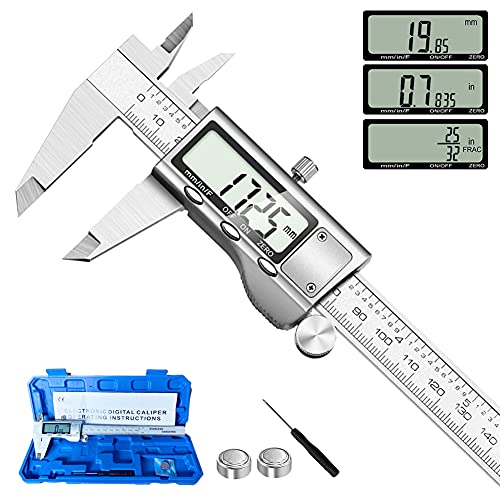
Digital measuring tools, such as laser distance measurers, play a crucial role in accurate measurements for various projects. Our step-by-step guide on calibrating a digital laser distance measurer aims to help you ensure precise and reliable measurements. By following this guide, you can feel confident in the accuracy of your tool, empowering you to complete your projects efficiently and effectively.


Inspect the Device
- Examine the digital laser distance measurer visually for any signs of physical damage.
- Check the lens and sensor areas for smudges, scratches, or obstructions that could impact its accuracy.
- Remove any debris or dust using a clean, dry cloth to ensure proper calibration.
- Handle the device carefully to prevent further damage while inspecting.
Select Calibration Mode
- Check User Manual: Locate your device’s user manual to find detailed instructions on how to identify and access the calibration mode.
- Follow Steps Carefully: Make sure to pay close attention to the steps provided in the manual to avoid any errors during calibration.
- Accessing Calibration Mode: Use the information from the manual to access the calibration mode on your device accurately. This will ensure precise calibration for optimal performance.
Prepare Calibration Target
- Position the calibration target securely on a flat surface at a fixed distance from the device.
- Ensure that the target is stable and won’t move during the calibration process.
- Verify the known distance between the device and the target to achieve accurate calibration results.
Initiate Calibration Process
- Follow the on-screen instructions to begin the calibration process instantly.
- Ensure you adhere to the prompts provided to set up the digital laser distance measurer.
- Proceed with the calibration by following each step precisely for accurate results.
Adjust Calibration Settings
- Follow the prompts on the device’s screen to select the calibration mode.
- Utilize the adjustment controls to fine-tune the settings as indicated by the on-screen instructions.
- Confirm the changes by following the device’s calibration completion process for accurate measurement results.
Verify Calibration Accuracy
Test the device by measuring known distances using a reliable measuring tool. Position the device at the starting point of the known distance and take a measurement. Compare the measurement displayed on the device to the actual known distance. Repeat this process for multiple distances to ensure consistent accuracy. Adjust calibration settings if necessary to match the known distances accurately.
Save Calibration Settings
To save your calibration settings after a successful calibration, navigate to the settings menu on your device. Look for an option that allows you to save or store the calibration data. Select this option and follow the prompts to confirm and save the settings. By saving your calibration data, you ensure that your device maintains accuracy for all future measurements.
Regular Maintenance
Periodically recalibrate your digital laser distance measurer to maintain accuracy. To do this, you need to locate the calibration feature in the settings menu. Follow the manufacturer’s instructions for calibration steps, which may involve using a known reference distance for accuracy verification. Regular recalibration will ensure precise measurements and optimal performance of your device.
Final Calibration Tips
In conclusion, calibrating a digital laser distance measurer is a straightforward process that ensures accurate measurements. By following the steps outlined in this guide, you can confidently calibrate your device for precise and reliable results. Remember to perform regular checks and adjustments to maintain the accuracy of your measurements. With proper calibration, you can optimize the performance of your digital laser distance measurer and make your work more efficient.
Necessary Equipment

Calibration Techniques and Advice
Utilizing Digital Measuring Tools Like a Pro
- Familiarize yourself with the different types of digital measuring tools available, such as tape measures, laser distance measurers, and digital calipers
- Read the user manual that comes with the digital measuring tool to understand its features and functionality
- Practice taking measurements on different surfaces and objects to get comfortable with using the tool accurately
- Keep the digital measuring tool clean and store it properly to maintain its accuracy and prolong its lifespan
- Take your time to double-check measurements and ensure you are using the tool correctly to avoid errors
Common Questions About Digital Measuring Tools
Yes, digital measuring tools can be used for both indoor and outdoor measurements. Many modern digital measuring devices come equipped with features such as laser technology or GPS that allow for accurate measurements in various settings. Just make sure to choose a tool that is suitable for outdoor use, as some models may have limitations in bright sunlight or adverse weather conditions. Overall, digital measuring tools provide versatility and precision for both indoor and outdoor measurements.
Digital measuring tools offer several advantages over traditional tools. One key benefit is their precision and accuracy. Digital tools provide highly accurate measurements, often to the nearest decimal point, which can be crucial for tasks that require exact measurements. Additionally, digital tools are typically user-friendly, with features such as digital displays that make readings easy to interpret. They also often offer multiple units of measurement and the ability to store and recall measurements, increasing efficiency and reducing human error. Lastly, digital measuring tools are often more durable and long-lasting compared to their traditional counterparts, making them a cost-effective choice in the long run.
In the future, we can expect digital measuring tools to become more advanced and user-friendly. Some trends we might see include the integration of AI and machine learning to enhance accuracy and efficiency, the development of more compact and portable devices for convenience, and the incorporation of cloud-based storage for easy access to data from anywhere. These tools are likely to evolve to provide real-time data analysis and customizable features to meet specific user needs. Overall, the future of digital measuring tools looks to be promising with continuous improvements in technology and innovation.
Yes, digital measuring tools can be used for both linear measurements, such as length, width, and height, as well as more complex measurements like area, volume, and angles. Digital measuring devices like laser measures and digital calipers can provide accurate readings for a wide range of measurements, making them versatile tools for various applications in different industries.
To calibrate digital measuring tools for accuracy, you should follow these steps:
- Use a known reference standard: Start by using a calibration standard with a known and traceable accuracy level.
- Perform a pre-calibration check: Before calibration, ensure the measuring tool is clean and in proper working condition.
- Adjust the tool settings: Follow the manufacturer’s instructions to adjust the settings as needed.
- Compare measurements: Take multiple readings on the calibration standard and compare them with the known values to adjust the tool’s accuracy.
- Document the results: Keep a record of the calibration process, including any adjustments made and the final accuracy achieved.
- Regularly recalibrate: It’s essential to recalibrate digital measuring tools regularly to maintain accuracy. Follow the recommended calibration schedule based on usage and environmental conditions.
By following these steps, you can ensure that your digital measuring tools are accurately calibrated for precise measurements.
Sure! Some common examples of digital measuring tools used in various industries include digital calipers for precise measurements in manufacturing, laser distance meters for construction projects, digital scales for weighing items in logistics, and multimeters for testing electrical circuits in electronics. These tools provide accuracy, reliability, and efficiency in a wide range of applications across different industries.
Digital measuring tools are highly portable due to their compact size and lightweight design. They are ideal for field use as they can easily be carried in your pocket or a small bag. In terms of usability, digital measuring tools are generally user-friendly with clear displays and intuitive interfaces, making them easy to operate even in outdoor environments. Additionally, many digital measuring tools come with features such as Bluetooth connectivity or apps that can enhance their functionality and convenience in the field. Overall, digital measuring tools are both portable and user-friendly, making them suitable for various field applications.
Digital measuring tools are typically more accurate than manual measurement methods. This is because digital tools eliminate the possibility of human error that can occur when using manual methods such as rulers or tape measures. Digital tools provide precise measurements in a consistent manner, ensuring reliable and accurate results. Additionally, digital tools often offer features like automatic calibration and data recording, further improving accuracy. Overall, digital measuring tools are a reliable choice for precise measurements.
Digital measuring tools work by featuring sensors that detect changes in position, distance, or other physical properties, which are then converted into digital signals for display or analysis. These tools rely on various technologies such as laser, ultrasonic, infrared, or GPS to accurately measure and record data. The technology used depends on the specific type of digital measuring tool and the desired level of accuracy.
Yes, there are software and apps available that can enhance the functionality of digital measuring tools. These tools can provide features such as cloud storage for measurements, the ability to convert units easily, integration with other software for data analysis, and even augmented reality capabilities for more advanced measurement tasks. Examples of such software include Leica DISTO™ Plan, Bosch MeasureOn, and Stanley Floor Plan App. Using these applications can help you maximize the utility of your digital measuring tools for various tasks.
Yes, there are limitations to using digital measuring tools in certain environmental conditions. For example, extreme temperatures, high humidity levels, dust, or water can affect the accuracy and functionality of digital measuring tools. Additionally, electronic components may be susceptible to damage in harsh conditions. It is important to check the specifications and operating conditions of digital measuring tools to ensure accurate readings and the longevity of the devices in various environments. Always follow the manufacturer’s guidelines for optimal performance.




Thank you for the tip! Ensuring a stable surface during calibration is crucial for accurate measurements.
I would recommend using a stable surface for calibration to avoid any discrepancies in measurements caused by shaky hands or uneven placement.
After calibrating, it’s useful to take test measurements at different distances to confirm the accuracy across the range of the device.
Great suggestion! Testing the accuracy at various distances is a good way to validate the calibration results.
Could you delve into advanced calibration techniques for professionals or enthusiasts looking to optimize their digital laser distance measurer’s performance beyond basic calibration?
I appreciate your suggestion! I’ll plan an article focusing on advanced calibration techniques for those seeking to enhance their device’s performance.
It would be helpful to include a section on troubleshooting common calibration issues that users may encounter during the process.
Thank you for the feedback! I will consider adding a troubleshooting section to address common calibration problems.
Can you recommend specific brands or models of digital laser distance measurers that are known for their accuracy and durability?
I can provide recommendations for reliable digital laser distance measurers in the next article. Stay tuned!
I found that ensuring the device is fully charged before calibration is essential for consistent performance. Low battery levels can affect accuracy.
Thank you for sharing your experience! Ensuring the device is fully charged is indeed crucial for maintaining accuracy during calibration.